Zhejiang University Opens Source Personal Agent: Issue Command from Mobile Phone, Execute on Computer
Zhejiang University Opens Source Personal Agent: Issue Command from Mobile Phone, Execute on Computer

2026-11-17 10:40
Introduction: Issue commands from your phone, execute tasks on your computer—critical operations still require your approval. What is nanoMuse? nanoMuse is an open-source personal agent developed by Zhejiang University, enabling each of your devices to run a full-fledged intelligent agent. Your phone reads messages, your computer performs tasks, and other devices display results. A simple “@Mac” command on your phone can delegate a task to your computer for execution. Operations like deletion or payment—actions that are irreversible—are paused for user confirmation. Tasks continue running in the background even after the app is closed.
What is nanoMuse?
nanoMuse is an open-source personal agent developed by a team from Zhejiang University. It enables every user-owned device to run a complete intelligent agent, allowing your phone to read messages, your computer to perform tasks, and other devices to view outcomes. By issuing a command like “@Mac + task” on your phone, you can delegate work to your computer. Approval workflows automatically flow back to your handheld device.
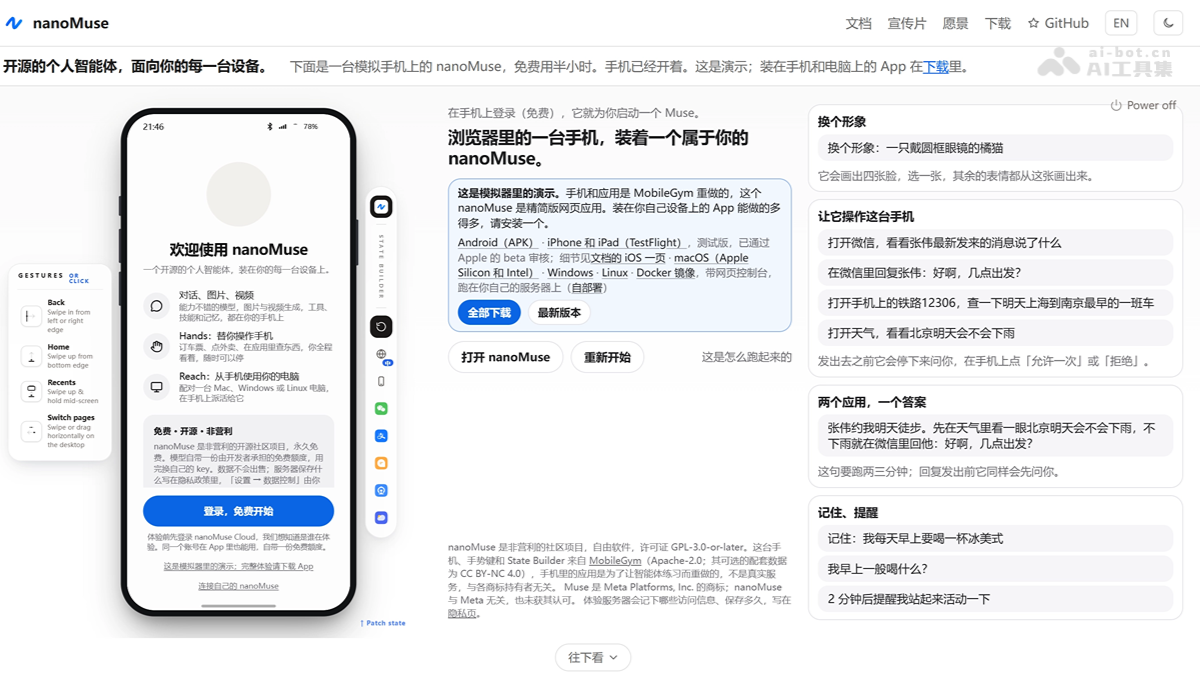
Key Features of nanoMuse
- Cross-Device Collaboration: Each device runs its own agent. Issue a command like “@Mac + task” from your phone to hand off execution to your computer, with approvals automatically returned to your mobile device.
- Screen-Level Interaction: Enable Hands mode to interact with native apps on your phone and windows on your computer just like a human—clicking, typing, and entering login credentials and CAPTCHAs manually when required.
- Security Approval: Irreversible actions such as deletion or payment are forcibly halted for user confirmation. You can configure settings as “once,” “current session,” or “always.” Passwords and verification codes are never processed by the Agent.
- Persistent Execution: Scheduled and recurring tasks continue running even after the app is closed. The system also generates personalized feeds daily.
- Fully Open-Source Self-Hosting: Clients for six platforms and the relay service are all licensed under GPL-3.0-or-later. You can deploy the relay on your own server and integrate with Feishu, DingTalk, Enterprise WeChat, Telegram, and more.

Follow WeChat and reply with open source to join the AI Open Source Project Community
How to Use nanoMuse
- Install the Client: Download the appropriate system package from https://nanomuse.cn/ for your computer; install the Android APK or use TestFlight for iOS.
- Log in with the Same Account: Use the same email or phone number to log in on both devices and ensure you’re using the same relay service.
- Configure the Model: You can use free quotas from community relays or add custom OpenAI-compatible endpoints (e.g., ModelScope API-Inference) by providing Base URL, Key, and Model ID.
- Confirm Device Online Status: Open the Devices page and verify that both your computer and phone appear in the device list and show as online.
- Initiate a Task: On your phone, type “@DeviceName + Task Instruction” (e.g., “@Mac calculate annual savings and write to savings.txt”) and send.
- View Results and Approve: The task executes automatically in the computer’s session, with replies synchronized back to your phone. For irreversible actions like deletion or payment, a confirmation request is pushed to your phone for approval or cancellation.
- Retrieve Files: Only text is synced across sessions; generated files must be transferred separately. Ensure your computer remains powered on and nanoMuse stays online during execution.
Core Advantages of nanoMuse
- Device Sovereignty: Agents run directly on your personal phone and computer—not on vendor cloud servers. Data never leaves your devices, enabling full self-hosting and control.
- Cross-Device Closed Loop: Seamless integration of phone commands, computer execution, and mobile-based approval makes nanoMuse the only open-source solution in the Muse ecosystem to achieve end-to-end cross-device task execution.
- Operation Without APIs: Uses “screenshots + Hands” to interact with native apps, overcoming the limitation of cloud-based agents being unable to access local mobile applications.
- Security and Control: Irreversible actions require mandatory approval; passwords and verification codes are entered manually, ensuring Agent autonomy remains within revocable boundaries.
- Model and Access Freedom: Supports 25 providers with built-in keys, free quotas, and direct login via existing ChatGPT/Claude/Kimi plans. Also integrates into popular IM platforms like Feishu, DingTalk, and Telegram.
Project Links for nanoMuse
- Official Website: https://nanomuse.cn/
- GitHub Repository: https://github.com/nano-muse/nanoMuse
- arXiv Technical Paper: https://arxiv.org/pdf/2610.08699
Comparison with Competitors
| Dimension | nanoMuse (Zhejiang University, Open Source) | Meta Muse (Closed-Source Commercial Product) |
|---|---|---|
| Agent Deployment Location | Your own phone and computer; relay optional | Each user has a dedicated Meta cloud-based Muse Secure VM |
| Computer Screen Interaction | Supported: Native support (Mac/Win/Linux) | Supported: Through macOS app, observing operations via “darkened real-time stage + stop button” |
| Phone Screen Interaction | Supported: Android screen-level Hands | Not Supported: No access to native mobile apps (VM cannot reach them) |
| Cross-Device Coordination | Supported: Task delegation between devices, approval flows back to mobile | Not Supported: All clients connect to a single cloud VM |
| Model Support | 25 provider integrations with built-in keys, free quotas, direct login for ChatGPT·Claude·Kimi plans | Locked to Meta’s proprietary Muse Spark 1.3 (1M context window) |
| Security Architecture | Sentinel local approval, manual password entry, fully self-hostable and auditable stack | Secure VM isolation + independent Sentinel monitoring egress traffic + credential vault (proxy only handles token substitutes) |
| Privacy Sovereignty | Conversational text can stay entirely within your home network (self-hosted relay); file screenshots do not pass through the relay | Meta explicitly states current architecture cannot prevent access to VM data for operational purposes; encrypted Confidential VM is limited to small-scale testing |
| Security Track Record | Version 0.1.31 fixed 27 audit findings; no major public vulnerabilities reported | Post-launch SEV-2 level VM exposure vulnerability (Reuters, Sept 25 report), over 6,800 exposed shared links, and a 0day reported by CNET |
| Availability | Global availability with 6 platform clients | Launched in the U.S., later expanded to Canada, Japan, and Singapore |
| Access Points | Self-hosted App + Web + Feishu/DingTalk/Enterprise WeChat/Telegram | App + muse.ai + WhatsApp (deep integration into Meta ecosystem) |
| Maturity Level | Released ~5 weeks ago, dozens of rapid iterations, 2.5k+ GitHub stars | Heavily funded Meta product, well-refined in audit tracking and purchase approval workflows, but third-party reviews vary widely (9.0/10 vs 55/100) |
Use Cases for nanoMuse
- Order via Phone, Fill Form on Computer: While commuting, have your phone read order numbers from your order app, then issue “@Mac” to delegate the task to your office computer, which auto-fills Excel and saves it to your work directory—ready to retrieve upon arrival at your desk.
- Automated Morning Briefing Before Work: Set up a nightly task on your phone to “summarize industry news I follow daily at 7 AM.” Your computer gathers data overnight and generates a feed, which you can read directly on your phone upon waking—task continues even if the app is closed.
- Computer Runs Long Tasks, Phone Manages Approval: Delegate long-running tasks like photo album organization or download folder cleanup to your computer. When deletion confirmation is needed, the approval prompt automatically pushes to your phone—approve with a tap during your commute to keep it running.
- Turn Chat Conversations into Actions: In Feishu or Telegram, @nanoMuse to convert reimbursement requests in the group chat into local tasks. Your computer opens the financial system and fills out forms, pausing before payment to let you enter your password for confirmation.
Source: AI Tools Hub
Disclaimer: Contains third-party opinions, does not constitute financial advice


Step Code – The Open-Source Terminal Programming Agent by Jieyue Star
09-24
Hy4 Preview Lightweight Version – Tencent Hunyuan's Open-Source Hy4 Quantized Compression Model
09-02
Claude Fable 5.1 – Anthropic's Latest Flagship Large Model
09-02
Open-source Retool is here, drag-and-drop backend with 60+ components
08-19
Claude Opus 5 is Here: Half the Price Approaching Fable 5
07-25
Tencent Open-Sources 260 Real-World Tasks to Test AI Workforce Capabilities
07-25
Meituan Open-Sources AI Exam Platform: 813 Minecraft Tasks
07-25


