K3.1 Pro can self-repair the emulator, with terminal task completion reaching 67.2%
K3.1 Pro can self-repair the emulator, with terminal task completion reaching 67.2%

2026-10-25 20:06
Introduction: Post-training reinforcement investment targets embodied intelligence and Agent deployment. With K3.1 Pro, my immediate reaction was: it's faster.
With K3.1 Pro, my first impression was: it's faster. Even on the Pro tier, it’s significantly quicker than the previous K3.
When K3 first launched, its speed was hard to assess. During this test, everything felt smooth and fluid. Although it doesn’t quite match the responsiveness of flash models from other vendors, it operates at a normal-to-fast cognitive speed.
Previously, many claimed that after distillation was banned, domestic large models would stop developing Pro versions. Kimi has now directly proven them wrong.
Speed and reasoning capabilities are converging again
This time I didn’t enable Highspeed mode—ordinary Pro performance already met my expectations. Kimi has also launched Pro Highspeed, officially described as delivering identical results to standard Pro but with model output speeds roughly 2–3 times faster.
However, this isn’t the full extent of the speed improvement from K3 to K3.1. Why is standard Pro faster? The official explanation doesn’t detail specific inference-side optimizations. Instead, technical blogs emphasize training advancements: Kimi has increased post-training investment, applying joint reinforcement learning across hundreds of downstream domains, while also enhancing long-context handling and task execution environments.
In benchmarks, task execution scores rose most notably. According to Artificial Analysis, a third-party evaluator, K3.1 Pro improved from 44 to 55 points (ranked 4th). On Terminal-Bench 4.0, task completion rate jumped from 12.6% to 67.2%, topping the leaderboard. This test requires models to complete tasks within a computer terminal environment, passing all validation checks to be considered successful.
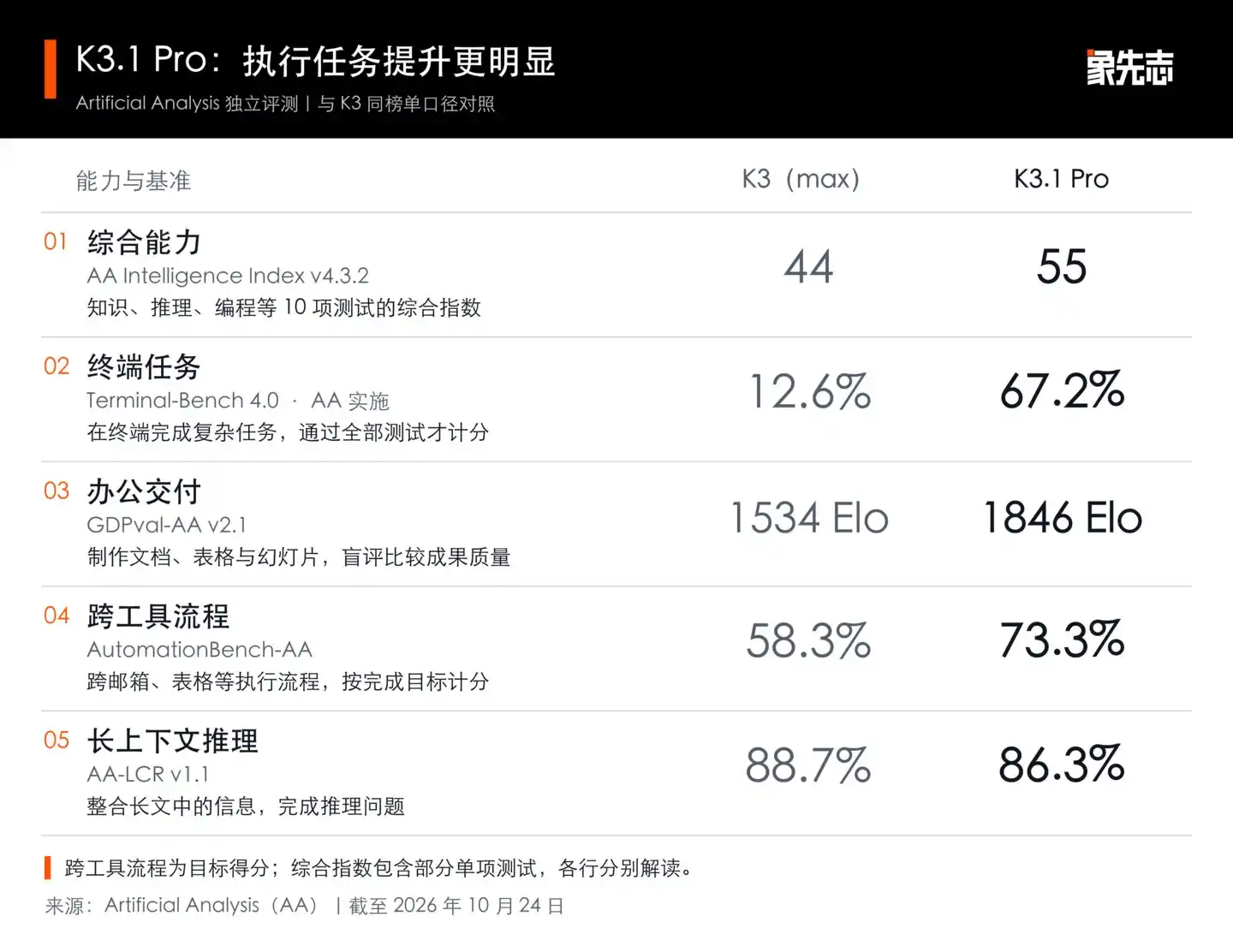
Task execution improvements were evident in independent evaluations; long-context reasoning saw a slight decline
For non-technical users, two office-related metrics hold greater relevance. GDPval-AA evaluates document, spreadsheet, and presentation quality—K3.1 Pro ranked 3rd. AutomationBench-AA tests cross-platform workflow competence across email, spreadsheets, and CRM systems; Pro’s task completion score rose from 58.3% to 73.3%.
In Kimi’s official scorecard, Pro led in two categories: SWE-Marathon v1.1 long-task programming scored 51.7%, surpassing Opus 5.5’s 46.3%; OfficeQA Pro v2 financial Q&A achieved 64.4%, outperforming Opus 62.2%. Both ranks were top among listed models. These Pro scores were self-tested by Kimi, with opponent data partially sourced from external rankings.
Progress wasn’t uniform. In the official HLE full-challenge test, Pro scored 70.0% when using tools—higher than Opus 5.5—but dropped to 51.1% without tools, below Opus’s 59.8%. In AA’s long-context reasoning test, K3 (Max) had 88.7%, while Pro registered 86.3%.
The official human locomotion demo is more intuitive: a virtual agent initially keeps falling, but after several training iterations, gradually learns continuous walking. K3.1 Pro autonomously wrote the simulator, scheduled training, evaluated outcomes, and adjusted strategies based on results. Initially, arm movements remained suboptimal despite reward tuning. The model then inspected the simulator, identified and fixed 36 errors in shoulder muscle torque calculations, and retrained the controller.
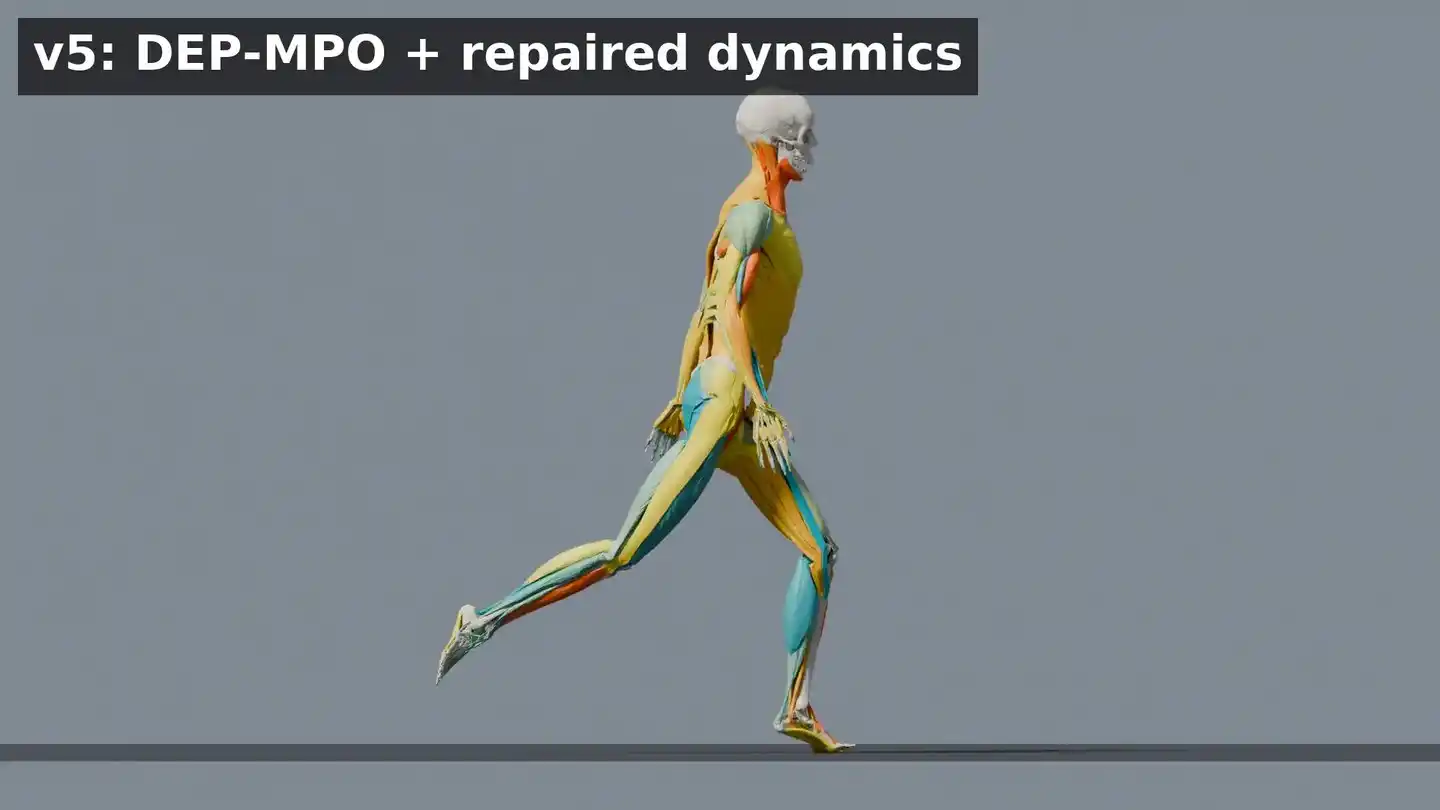
Official demo: virtual agent evolves from falling to continuous walking
Human motion arises from simulation and control policy. Kimi continuously improves training based on feedback. It didn’t just tweak rewards—it discovered bugs in the simulator. This aspect fascinates me more than how closely the final motion resembles human gait.
Long tasks naturally increase invocation volume. Kimi has reduced API output pricing for standard Pro: 100 yuan per million output tokens for K3, 68 yuan for Pro, and 136 yuan for Highspeed. Tokens are the unit measuring text and code usage on the platform; monthly subscribers still use bundled quotas.
Kimi Code’s high-speed version consumes about twice the quota, with speedup limited to model generation phase. File I/O, command execution, and program runtime remain unchanged. When standard Pro is fast enough, I’d reserve quota for subsequent edits.
Speed has improved, but quotas may not suffice
Some users feel standard Pro is fast enough. One user shared an invocation log showing 111 tokens per second, indicating no need for Highspeed mode.
Chetaslua, granted early access by Kimi, released a web demo. He claims the result was generated in one model run, and provided a CodePen link—readers can open it directly to see the outcome.
Others encountered quota issues during iterative revisions.
LanceYang provided five reference images, asking the model to create an interactive 3D game controller. After two rounds of revision, component shapes and spatial relationships still didn’t align. During model verification, he hit usage limits. Using a 199-yuan plan, he had already consumed part of his quota before starting the project.
In the well-known “Pelican Riding a Bike” test, two users reported vastly different consumption. One used a 199-yuan plan, selected Highspeed and maximum thinking level, then requested “continue optimizing”—quota nearly exhausted. Another, on a 599-yuan plan with same model settings, said a single pelican task consumed only ~6%. Differences in plans, tasks, and revision processes make it hard to judge cost-effectiveness solely by ratio. Overall, token consumption remains somewhat opaque.
Per Kimi’s rules, all features share a monthly quota. Model selection, context length, and tool calls all affect usage. Code has additional rolling quota caps. Whether a user completes a project depends on total usage from generation to revision.
Scenarios have minor bugs, but self-repair capability exists
I selected seven coding problems, each in a fresh session, allowing Kimi to run, check, and revise autonomously. Final delivery was reviewed post-completion—no manual code changes were made. Screenshots, GIFs, and prompt excerpts are below; full prompts and input materials are included in the release package.
“Pelican Riding a Bike” has been tested too often—possible dataset optimization concerns. So we opted for: “Let the bicycle ride the pelican.”
Actual prompt (excerpt): Two equally sized stages play simultaneously—one side shows “pelican riding a bicycle,” the other “bicycle riding a pelican.” … The bicycle is supported by the pelican’s back, both wheels off the ground, pelican alternately stepping forward.

The bicycle reaches above the pelican but fails to land on its back
Kimi performed left-right comparison: left side shows pelican pedaling, right side shows pelican walking, bicycle hovering above. Positions swapped, but gap remains between bike and bird’s back—no visible support. This should logically connect the pelican and bicycle via preceding nodes, causing later suspension. Another minor issue: bicycle wheels keep spinning, which is logically inconsistent but fixable.
Physics tasks performed better. We set small balls colliding inside a rotating heptagon, observing actual collision and motion patterns—results were impressive.
Actual prompt (excerpt): Circumscribed circle radius of regular heptagon is 320, rotating clockwise at 0.2 radians/second. Place 20 small balls (radius 12) numbered 1–20, initially non-overlapping, subject to vertical downward gravity of 500 pixels/sec². … Wall bounces must account for local velocity of rotating walls.
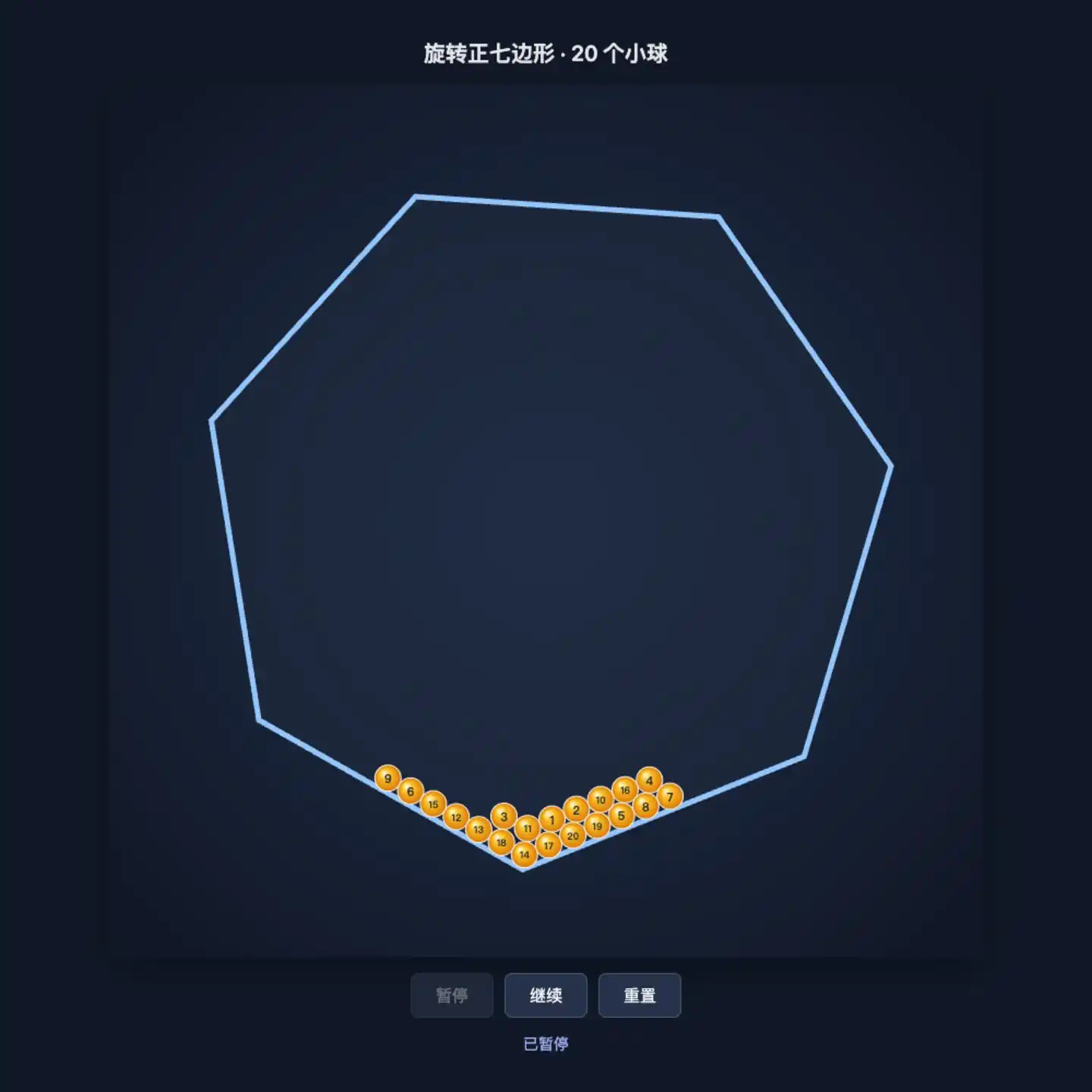
Balls rotate with frame, lifted up, then roll back down
Continuous simulation and position checks revealed no wall penetration or ball loss. It correctly incorporated wall motion into bounce calculations. The initial draft is already suitable for demonstrating gravity and collisions.
For audio analysis, I substituted low- and high-frequency files to verify if spectra accurately reflect input.
Actual prompt (excerpt): Analyze real-time playback sound via Web Audio API, display spectrum, RMS loudness, and dominant frequency in Hz; frequency axis range must cover at least 0–4000Hz, using interpretable real data—no pre-programmed rhythm animations allowed. Volume slider affects both output and analysis. … F05-demo.wav is provided for development, but code must support other files of the same format.
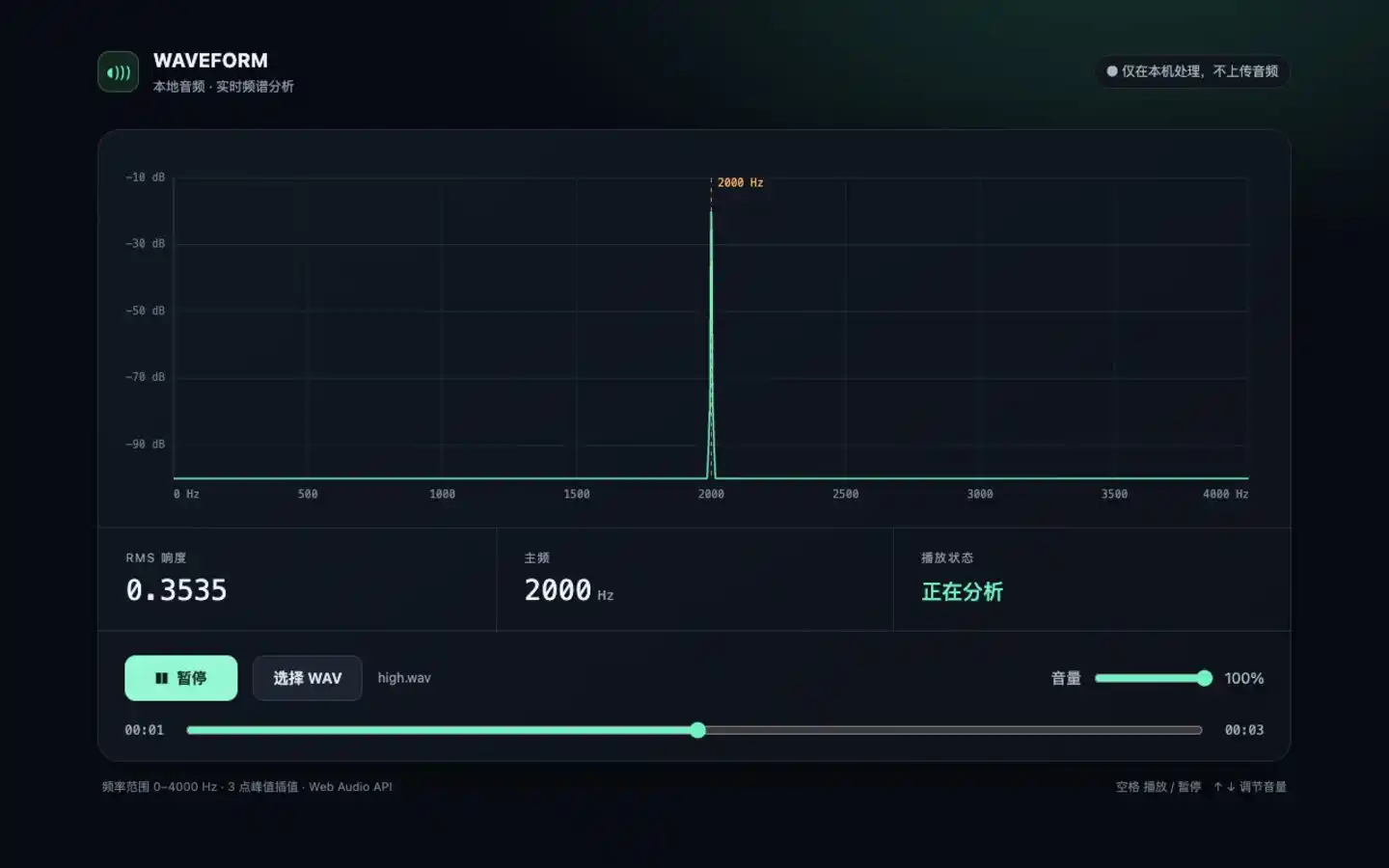
New audio uploaded—spectrum and readings still align
After switching to low/high-frequency files, charts matched frequency readings. Halving volume halved measured amplitude; muting brought amplitude to zero, and dominant frequency ceased displaying.
However, short sounds linger slightly on the graph before disappearing. For judging pitch and intensity, it’s sufficient—but syncing visuals precisely with drum beats still needs adjustment.
The pixel runner is only 12×8 pixels, requiring four frames to depict running.
Actual prompt (excerpt): Use up to 32 fixed RGB colors to draw colorful roads, starfields, and a 12×8-pixel runner. The runner must have a recognizable four-frame running cycle, body always maintaining 12×8 logical dimensions; road scrolls left, character stays centered horizontally.

Four poses combined into running animation—character retains pixel art style
Size, color count, and frame count all meet requirements. Limbs alternate swinging, colorful road scrolls backward—though simple, the running motion is clearly identifiable.
Another task required a single card to morph continuously between UI elements like buttons, loaders, success checkmarks, players, volume controls, switches, bar charts, and tooltips, returning to button.
Actual prompt (excerpt): A single card shell transforms sequentially over 16 seconds into button, loader, success checkmark, player, volume control, switch, bar chart, tooltip, then back to button. … Show state transitions through continuous changes in shape, corner radius, size, icons, and text—not merely page-level swaps.
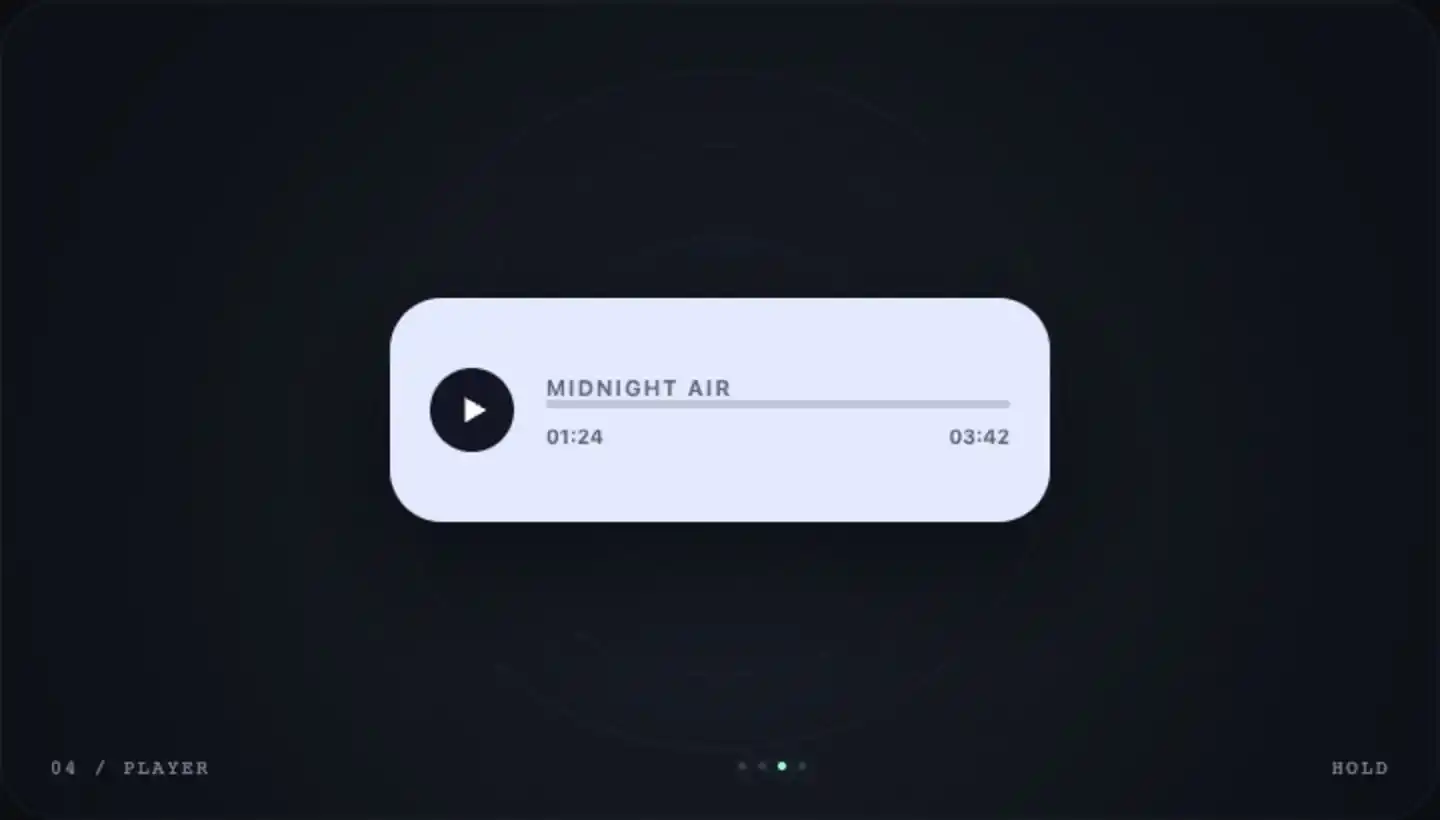
Same card morphs between buttons, players, and other UI components
Most transitions were smooth—issues emerged at the end: prompt text vanished first, leaving a blank button; next cycle, text suddenly reappeared. Easy to miss in static screenshots, but obvious during playback.
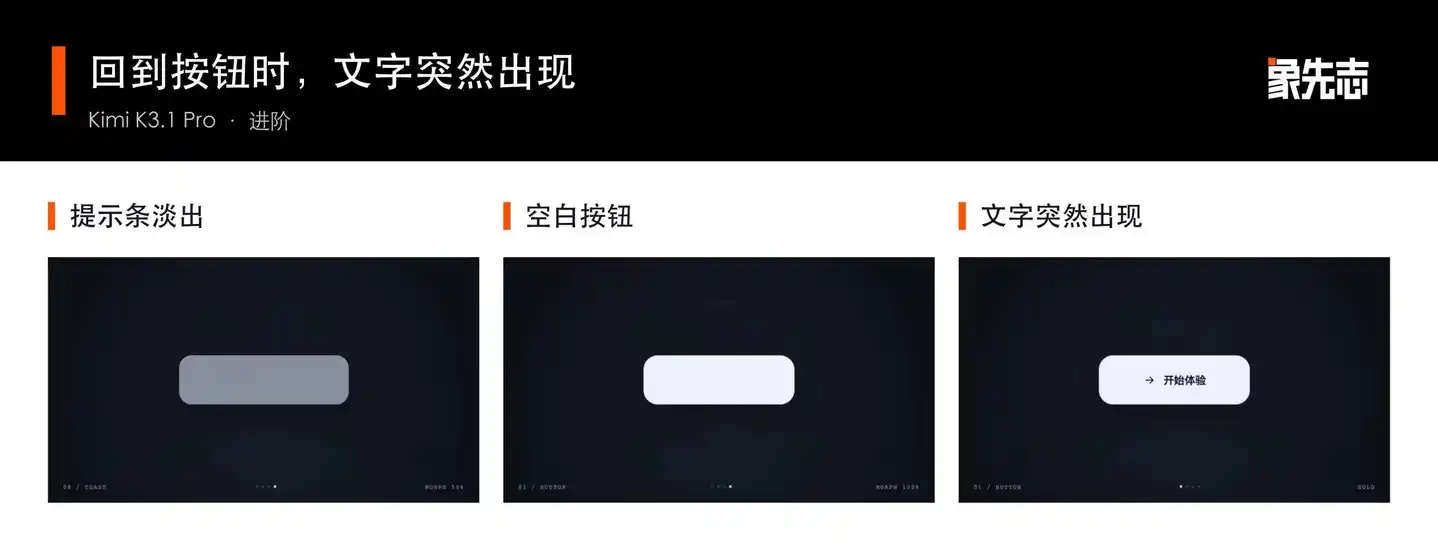
Text reappears abruptly upon returning to button state
In the 3D modeling evaluation segment, we chose the “Along the River During the Qingming Festival” case, specifically demanding moving people and boats. Bridge height must adjust dynamically underfoot; porters must retrieve goods before heading to docks. Zooming in reveals whether actions sync properly with scenes.
Actual prompt (excerpt): Create a 3D scene of “Along the River During the Qingming Festival” navigable freely in browser, focusing on Bian River, wooden arch bridge, bridgehead market, riverside shops, and distant city gate. … Characters must have discernible body and limb movements, continuously performing various activities—including walking along streets, crossing bridges, trading at stalls, and loading/unloading cargo at docks. Boats must sail along the river, crew members moving with the vessel. Pedestrians move along walkable paths, docks, and bridge surfaces, feet aligned with current ground or bridge elevation—no entering river, buildings, stalls, or jumping over railings.
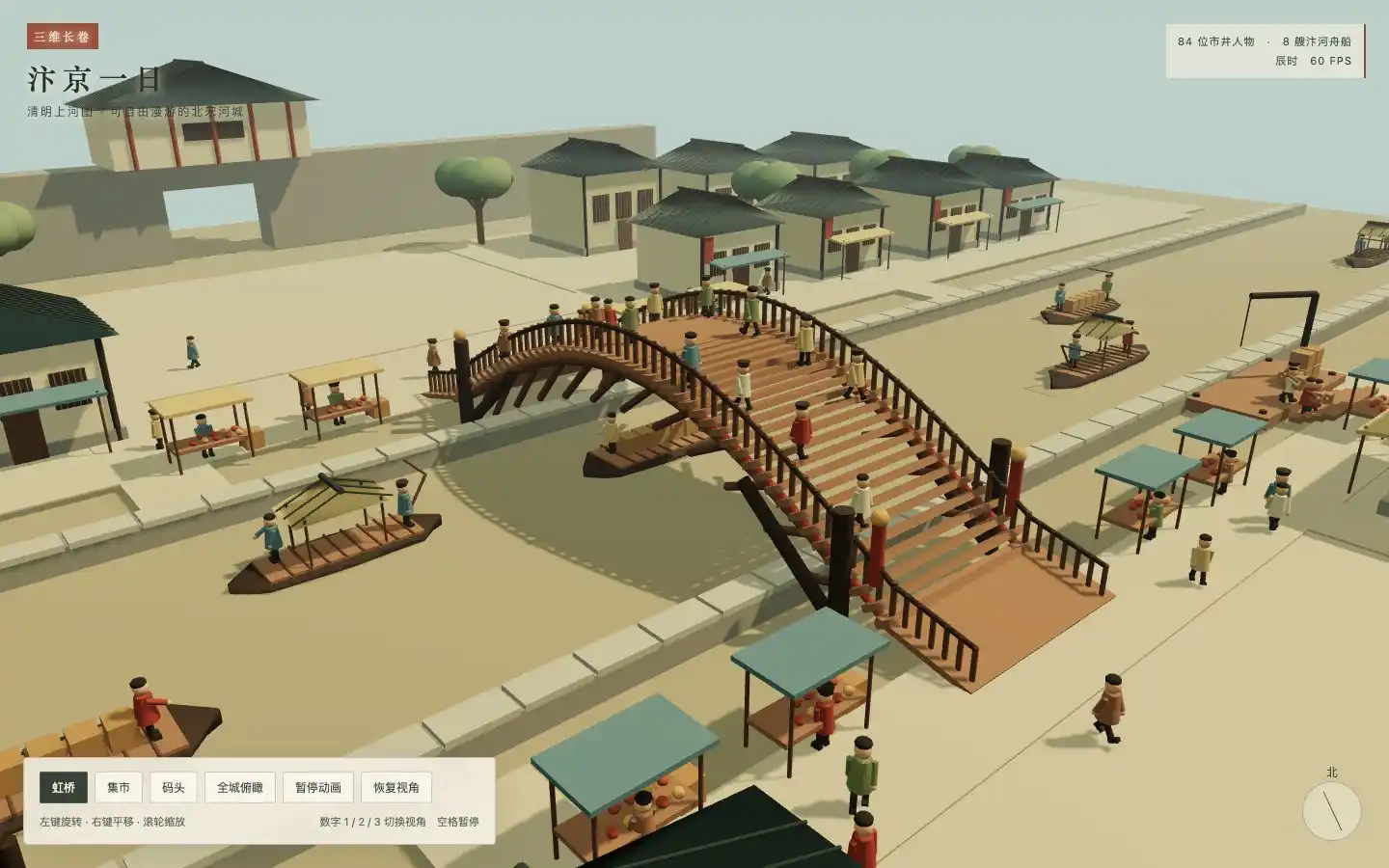
Arch bridge, street markets, and docks rendered as viewable 3D scenes
During creation, I observed characters floating mid-air and some walking into the river or through shops—these issues occurred initially. Then Kimi self-corrected.
Kimi began adjusting incrementally—fixing tunneling, walking-through-river problems—basic logic flaws we didn’t add extra prompts for. It also autonomously corrected character heights and revised walking paths through shops.
Most impressive: shadow calculations were highly accurate—clearly, the model is beginning to grasp real-world physical laws.
All these corrections occurred within Kimi’s own inspection loop—we added no further revision prompts.
Final delivery: porters pick up cargo, walk to dock, return empty-handed; customers pause at stalls. Close inspection reveals flaws: pedestrians pass through shop walls during movement. River issues: water surface obscured by ground, making boats appear to glide on land.
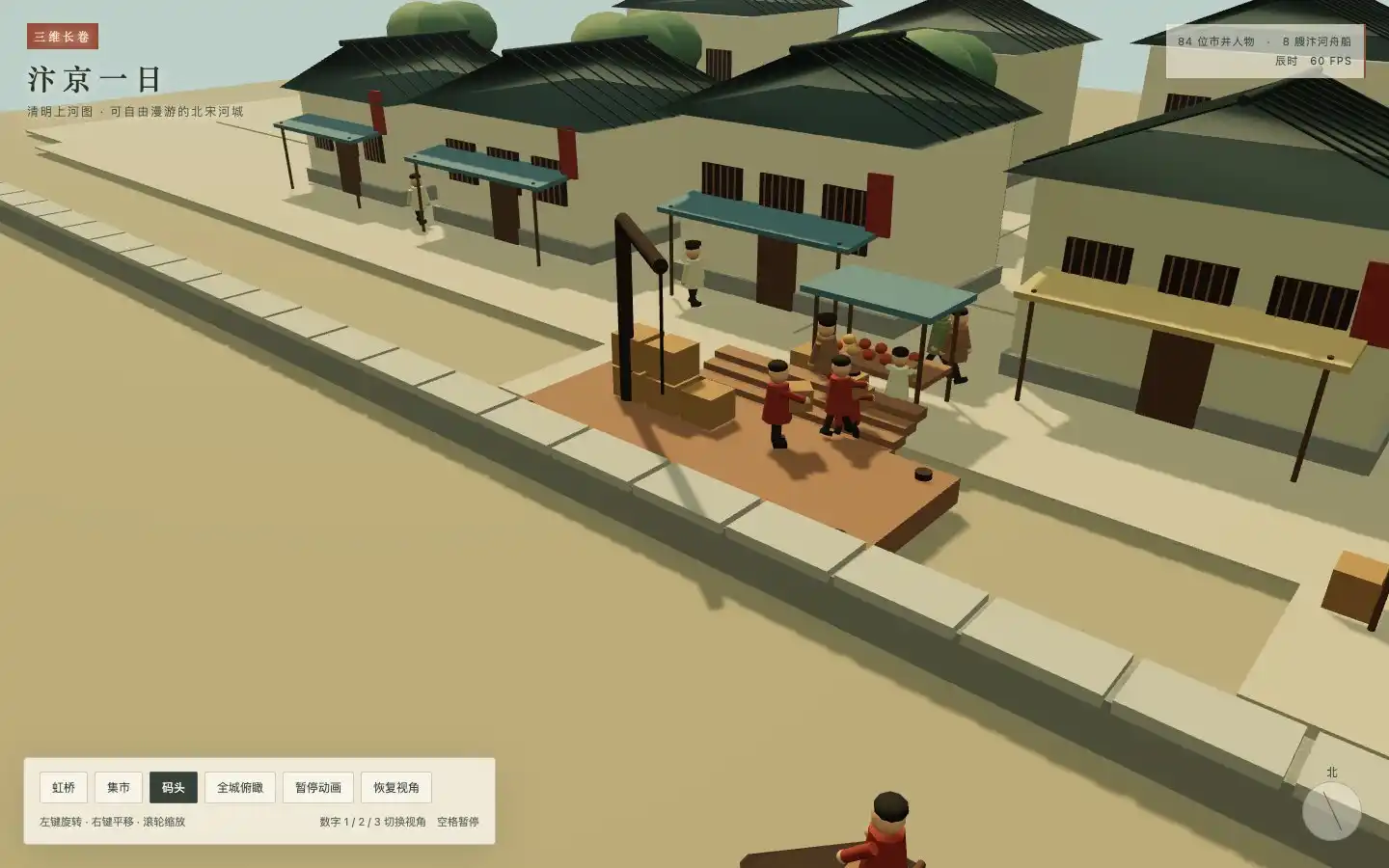
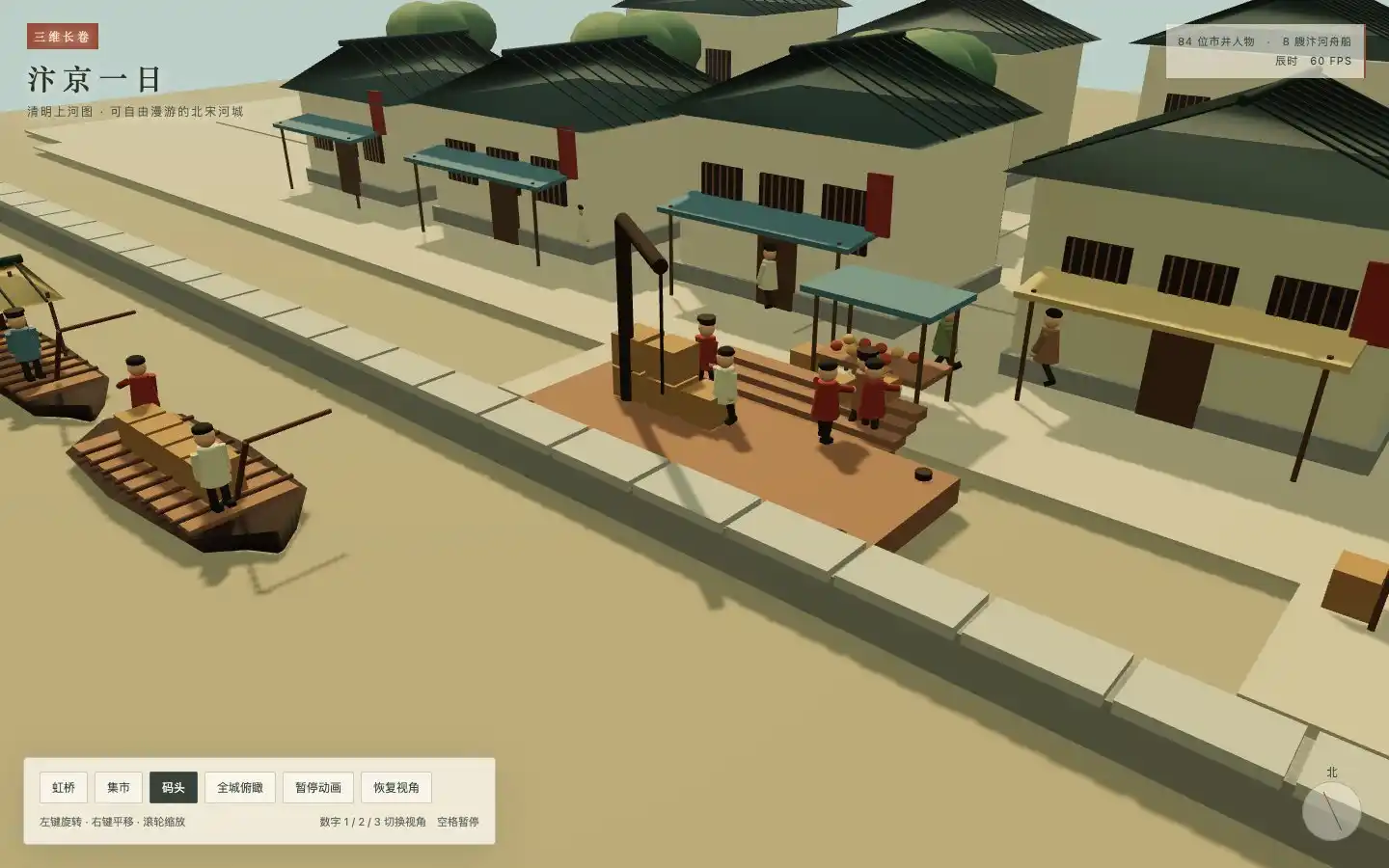
Final version still has pedestrians passing through shops and water surface obscured by ground
Finally, I asked Kimi to build a standalone video editor. Timeline, preview, and export must use the same editing state; refreshing the page must preserve prior edits.
Actual prompt (excerpt): Each clip allows precise in/out points; supports splitting clips at current playback head, deleting clips, reordering sequences, and undo/redo editing. … True WebM export must be playable in real time. Export must reflect cutting and reordering—cannot download raw video as fake export. … Save project state locally; after refresh or reopen, restore imported assets and edit history.
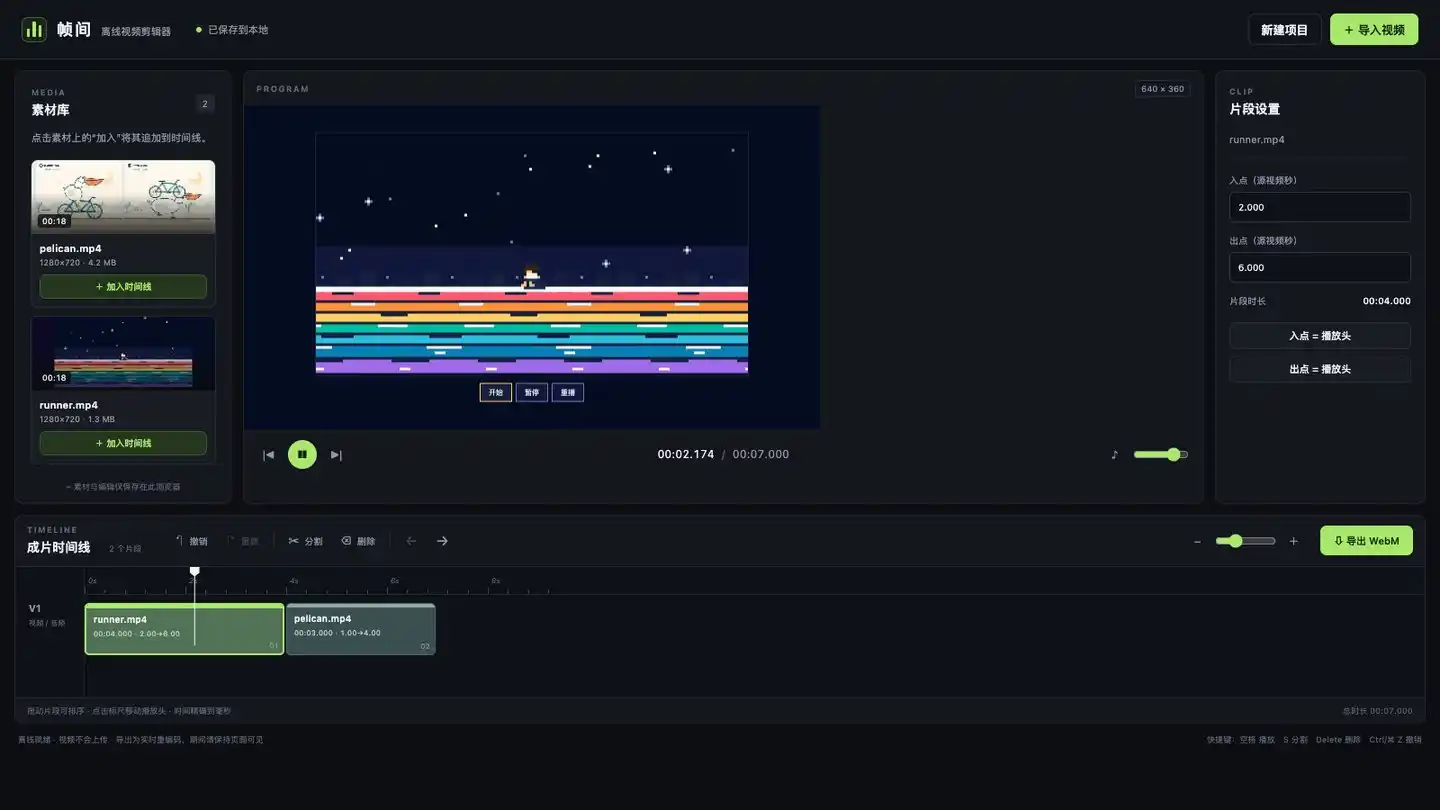
Reordered edited clips can be exported as final cut
We imported footage of the runner and pelican, clipped segments, adjusted order to place runner first, then pelican. Checked exported video—sequence and ranges matched perfectly. Refreshing the page restored both assets and timeline. Splitting, deletion, undo/redo all functioned normally. This initial draft already handles basic editing tasks.
Export file has a minor flaw: in Edge browser, video duration isn’t detected immediately upon opening—only after playing once. Video content is correct, but metadata isn’t fully processed yet.
This round confirms physics, audio analysis, and simple video editing already have practical utility. Several visual tasks delivered draft outputs ready for refinement—spatial relationships and animation transitions still require review.
Kimi positions Pro as the first model in the K3.1 series; Flash or Ultra versions haven’t been announced yet. If Flash launches later, I’ll care most about whether it reduces costs from frequent invocations.
Multiple Agents working concurrently generate more model calls. If Flash can handle simple steps faster and cheaper, developers can delegate complex problems to Pro.
Earlier reports indicate Moonshot AI is hiring embodied intelligence talent—some robotics company employees received Kimi recruitment calls. Internal sources cited reservations about Agentic Robotics (Agent-based Robotics) direction.
Google has experimented with Flash in robotics. Building on Gemini 3.5 Flash, specialized embodied reasoning training produced Gemini Robotics ER 2. This model observes environment, plans, monitors tasks, then invokes lower-level action models for execution.
The human walking demo, coupled with embodied intelligence hiring, makes it hard to believe Kimi isn’t pursuing this domain further.
My current favorite embodied approach: let strong models participate in design and train refinement, enabling control policies to learn motion in simulation. During real operation, fast models observe environment, plan tasks, then hand off to lower-level controllers. Training can iterate endlessly; robots must react instantly to dynamic environments. If Kimi releases a low-latency, low-cost multimodal Flash model in the future, it could power observation and planning stages.
As for Ultra, I anticipate it will close gaps in difficult reasoning and long-haul tasks. Pro still lags in non-tool challenges.
Though no “shock-and-awe” moment here, steady progress toward real-world physics and overall capability enhancement is clear—especially since this update builds atop K3’s foundation.
Kimi has submitted its deliverables. Now we wait for Qwen4 to go open-source.
Source: Xiangxianzhi
Disclaimer: Contains third-party opinions, does not constitute financial advice


AI is not a search bar—it's a supercomputer costing just a few dozen dollars
08-05
Anthropic Locks in 6 Years of Compute with $10 Billion Commitment
08-05Not building robots—why is it worth $14 billion?
07-31AI is no longer competing on benchmark scores, but on profitability
07-25
ByteDance's Douyin Beans priced at 68 RMB—worth it for 382 million monthly active users?
07-25
Fields Medalist Concerned About AI Extinction Heads to OpenAI
07-25
Meta gives away models for free—who dares to price AI now?
07-24


