Free and open-source Mac input method, with screen recording feedback enabling the Agent to automatically fix issues
Free and open-source Mac input method, with screen recording feedback enabling the Agent to automatically fix issues

2026-11-10 14:49
Introduction: Voice recording and screen capture automatically generate feedback checklists ready for repair by Claude Code. What is Blurt? Blurt is an AGIHunt open-source Agent-era input method tool.
What is Blurt?
Blurt is an open-source input method tool from AGIHunt for the era of AI Agents. Blurt leverages fn-key voice transcription, screenshot annotation, screen text extraction, and screen recording walkthroughs to enable AI to automatically organize verbal feedback into structured task lists complete with screenshots, reproduction steps, and suspected code locations. Blurt supports video-style review workflows, export to Feishu/GitHub, or direct Agent-based fixes per item.
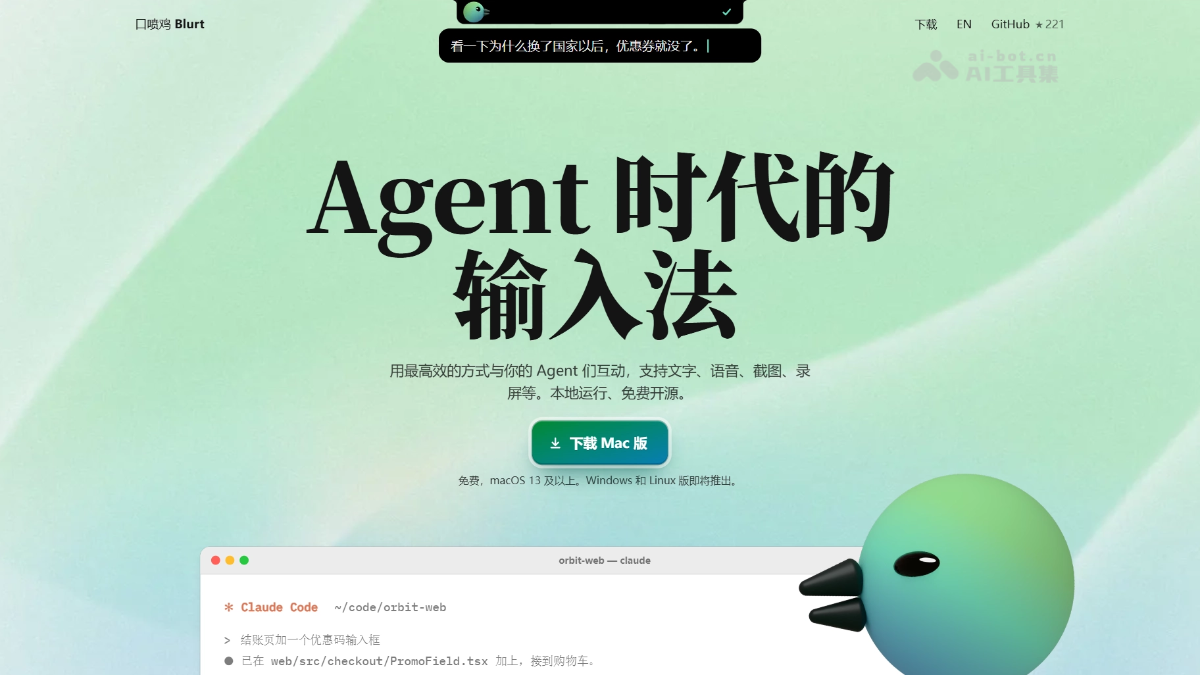
Core Features of Blurt
- Voice Transcription (fn): Speak with a single press; text is directly inserted at cursor position, supporting "speaking Chinese while typing English" and one-click conversion into a checklist.
- Screenshot Annotation (⌥A): After selecting a screenshot, draw circles or boxes and simultaneously record voice notes—screenshots are automatically suspended and draggable for immediate sharing.
- Screen Text Extraction (⌥C / ⌥T): Select unselectable text on-screen for OCR copy, or translate it directly into English.
- Voice Notes (⌥V): One-click recording up to 10 minutes, ideal for impromptu discussions and rapid idea capture.
- Screen Recording Walkthrough (⌥R): Verbally critique while operating—Agents automatically split the session into a checklist with screenshots, reproduction steps, and suspected code positions.
- Task Review & Export: Review items like scrolling through short videos, exportable to Feishu multi-dimensional tables, GitHub Issues, or Markdown.
- Agent Repair Loop: Select tasks to trigger Claude Code/Codex repairs via git worktree; mark changes as “pending verification” after completion, then merge upon human confirmation.
- MCP Interface: Any Agent can read/write to the task database via MCP, enabling state synchronization and batch processing.

Follow WeChat and reply "open source" to join the AI Open Source Project Community
How to Use Blurt
- Download & Install: Visit Blurt’s official site https://blurt.work/ to download the Mac version, or run
curl -fsSL https://blurt.work/install.sh | shin a terminal—can be automated by Claude Code or Codex. - Grant Permissions: Manually enable microphone and accessibility permissions in System Settings.
- Configure Models: Default macOS speech recognition works out of the box; for higher accuracy, download local models or enter API keys for cloud ASR/post-processing models in settings.
- Connect Agent: In Blurt’s “Settings → Agent,” click “Connect” and integrate skills and MCP into agents like Claude Code or Codex.
- Begin Blurt Session: Start a new chat in your Agent, say “Start Blurt” to enter workflow mode.
- Record Feedback: Press ⌥R to select a window or region, verbally critique during operation—click “Complete” or press ⌥R again to end.
- Wait for Processing: The Agent automatically splits the recording into a checklist with screenshots, verbatim audio, reproduction steps, and suspected code locations.
- Review & Confirm: Go through each item locally; confirm correctness before exporting or initiating repair.
- Delegate to Agent for Repair: Select an item and press ⌘↩—Claude Code/Codex will modify the code per git worktree, marking changes as “pending verification.”
- Verify & Merge: Inspect the Agent’s changes, confirm correctness, then merge—completing the full feedback loop.
Core Advantages of Blurt
- Unified Multimodal Entry Point: Integrates voice, screenshots, screen recording, and text extraction under a single set of keyboard shortcuts—covering all communication scenarios between humans and Agents.
- Extremely Low Communication Overhead: Transforms tedious feedback workflows (“typing + screenshots + drawing + writing steps”) into effortless “verbal ranting while operating.”
- Deep Agent Integration: Native support for Claude Code/Codex skills + MCP; tasks flow seamlessly through git worktree repair → pending verification → merge cycle.
- Local-First, Free, Unlimited: Recognition runs locally by default, no account needed, data stays on-device—fully free and open-source, competing with $12/month subscription tools like Typeless.
- High Speed: Officially claims sub-0.4s latency from speech stop to text output—faster than Wispr Flow (~1.5s) and Typeless (~3.0s).
- Pragmatic Engineering Trade-offs: Deterministic tasks like screen recording, frame extraction, and coordinate parsing are handled by scripts; only model inference handles interpretation—keeping token costs low at ~$2–2.6 per 7–20 minutes of recording.
Project Repository for Blurt
- Official Website: https://blurt.work/
- GitHub Repository: https://github.com/AGIHunt/blurt
Competitive Comparison with Similar Tools
| Comparison Dimension | Blurt | Typeless |
|---|---|---|
| Product Positioning | Multimodal input method + screen recording walkthrough tool for the Agent era | Cross-platform AI voice transcription/rephrasing tool |
| Open-Source License | MIT Open Source (github.com/AGIHunt/blurt) | Closed-source commercial product |
| Pricing | Fully free, unlimited word count | Free tier: 8,000 words/week; Pro: $12/month (annual) or $30/month (monthly) |
| Recognition Location | Local-first (macOS Speech/SenseVoice/Whisper, optional cloud Key) | Cloud-only processing, no offline mode, requires internet connection |
| Free Quota | Unlimited | 8,000 words/week (~30–45 min audio), beyond which payment required |
| Core Interaction | fn transcription, ⌥A screenshot + voice, ⌥C screen text extraction, ⌥R screen recording walkthrough | Hold to speak, release to trigger AI rephrasing and polishing |
| Agent Integration | Native skill + MCP, supports git worktree repair and status reporting | No Agent workflow integration |
| Screen Recording → Task | Supported: AI splits into checklist with screenshots, reproduction steps, suspected code locations | Not supported |
| Translation Capability | Speak Chinese, type English (bidirectional translation, local or cloud option) | Supported, auto-detects over 100 languages |
| Platform Support | macOS 13+ (partial Win/Linux features via CI, tray version upcoming) | Mac, Windows, Linux, iOS, Android (widest cross-platform coverage) |
| Official Latency Claim | 0.39 seconds (self-tested) | ≈3.0 seconds (Blurt website cites VoiceDash data) |
| Privacy | All data remains on-device, no account required, local recognition | Audio sent to cloud for transcription (zero retention claim, but 2026 reverse engineering report questioned “on-device” marketing vs. actual cloud processing) |
Use Cases for Blurt
- AI Programming Review Feedback: Record screen while critiquing vibe-coded outputs—Agents automatically generate bug checklists with screenshots, reproduction steps, and suspected code locations, following the “review → worktree fix → pending verification → merge” loop.
- Requirement Research & Idea Collection: Spontaneously comment while browsing competitor sites or reference pages—automatically generate idea lists and compile them into a summary page and proposal.
- Cross-role Collaboration Communication: Product, design, operations, even clients without coding knowledge can just install the app, record screens, and send—developers use Agents combined with codebases for analysis, lowering collaboration barriers.
- Daily Efficient Input: Use fn-key voice typing in any app—terminal, Slack, Feishu, WeChat—supporting “speak Chinese, type English,” one-click checklist generation, replacing manual typing.
- Screen Information Capture: Select text from images, videos, pop-ups for OCR copy or translation—also one-click screenshot annotation and sharing with colleagues or AI.
Source: AI Tools Hub
Disclaimer: Contains third-party opinions, does not constitute financial advice


Step Code – The Open-Source Terminal Programming Agent by Jieyue Star
09-24
Hy4 Preview Lightweight Version – Tencent Hunyuan's Open-Source Hy4 Quantized Compression Model
09-02
Claude Fable 5.1 – Anthropic's Latest Flagship Large Model
09-02
Open-source Retool is here, drag-and-drop backend with 60+ components
08-19
Claude Opus 5 is Here: Half the Price Approaching Fable 5
07-25
Tencent Open-Sources 260 Real-World Tasks to Test AI Workforce Capabilities
07-25
Meituan Open-Sources AI Exam Platform: 813 Minecraft Tasks
07-25


